أوتوريبلاي برو AutoReply Pro

إنستجرام وفيسبوك وتيك توك · بالعربية أولاً

من تعليق إلى محادثة خاصة

كلمةٌ مفتاحية في تعليق تُرسل الرسالة الخاصة، وتنشر الردّ العام، وتسجّل الإعجاب. وما يأتي بعدها يتولّاه الذكاء الاصطناعي بتعليماتك أنت. واستوديو الكاروسيل يحوّل دروسك المصوّرة إلى منشورات لإنستجرام وفيسبوك وتيك توك.

تواصل معنا

اكتب لنا بما تريد أتمتته، ونردّ بالسعر والمدة المتوقعة للربط قبل أي التزام.

لمن صُنع

لكل من يبيع من حسابه، لجمهورٍ يكتب له بالعربية:

  • صنّاع المحتوى

    تمتلئ التعليقات بالسؤال نفسه. كلمةٌ واحدة في الحملة تجيب عنه على الخاص، بكلماتك أنت، وأنت تصوّر المقطع التالي.

  • بائعو الدورات

    دروسك تصير كاروسيلات تدلّ على الدورة، وكلمةٌ في التعليقات توصل رابطها على الخاص — وهذا ما تفعله المنشورات المعروضة في الأسفل.

  • المتاجر والأنشطة الصغيرة

    «بكم؟» و«فيه توصيل؟» و«وين موقعكم؟» تصل تعليقاتٍ، والجواب يذهب إلى الخاص، بالعربية التي يكتب بها عملاؤك فعلاً.

ماذا يحدث حين يعلّق أحدهم

ثلاث خطوات على إنستجرام وفيسبوك، والأولى وحدها من العميل. الباقي يجري من تلقاء نفسه:

  1. المطابقة

    أنت تكتب الكلمات في الحملة — أكثر من كلمة إن شئت — وتختار: على منشور بعينه، أم على كل منشورات الحساب. وحملةُ المنشور الواحد تسبق الحملة العامة على الكلمة نفسها، فلا تتنازع اثنتان على تعليق واحد.

    كلمات الحملة السعر بكم كم سعرها

  2. الرسالة الخاصة

    نصُّ الحملة يصل صاحبَ التعليق على الخاص — لا في التعليقات، حيث يقرأها الجميع ولا يردّ عليها أحد. وإن ردّ، تولّى الذكاء الاصطناعي بقيّة المحادثة بتعليماتك ومعلومات نشاطك، وتتصدّر أولَ ردٍّ آليّ في المحادثة عبارةٌ تُفصح أنها خدمة آلية، كما تشترط ميتا.

    العبارة التي يضيفها البرنامج «🤖 رد آلي من المساعد الذكي»

  3. الأثر العام

    ردٌّ عام تحت التعليق يخبره أن يفتح رسائله، وإعجابٌ بالتعليق. الردّ العام اختياري وتكتبه في الحملة، والإعجاب يُحاوَل دائماً.

    إن رفضت ميتا الردّ العام — صلاحية ناقصة، أو تعليق حُذف — تبقى الرسالة الخاصة مُرسَلة، ويُسجَّل سبب الفشل على التفاعل نفسه.

العربية هنا ليست ترجمة

الناس لا تكتب الكلمة نفسها مرتين بالطريقة نفسها. هذه أربع كتابات لكلمة واحدة، وكلها تُطابق كلمة مفتاحية واحدة:

  • هديه
  • هديـــة
  • هديّة
  • الهدية

تُوحَّد جميعها إلى

هدية

نُوحِّد الهمزات (أ إ آ ← ا)، والتاء المربوطة (ة ← ه)، والألف المقصورة (ى ← ي)، ونحذف التشكيل والتطويل، قبل أن نقارن. وللكلمات القصيرة خطرٌ معروف: «تم» تقع داخل «اهتمام» و«تمام»، فلكل حملة وضع مطابقة تختاره — داخل الكلمة، أو كلمة كاملة.

واللوحة نفسها من اليمين إلى اليسار أصلاً، لا تصميم إنجليزي صُبّت فيه العربية. والأرقام لاتينية عن قصد، لأنها تُقارَن وتُنسخ مقابل لوحات ميتا نفسها.

هويّتك وصوتك
ألوانك وخطوطك وتوقيعك على كل شريحة، ودليلُ أسلوبٍ يكتب به الذكاء الاصطناعي بصوتك أنت ولهجتك أنت.
دعواتك أنت إلى الفعل
الشريحة الأخيرة، وسطر التعليق، والرسالة الخاصة، كلها بالكلمات التي تضعها في الإعدادات: سطرٌ لإنستجرام، وسطرٌ لتيك توك.
كلمة مفتاحية لكل منشور
كل كاروسيل يأتي بكلمته المفتاحية ورسالتها الخاصة، فيصبّ المنشور في الحلقة التي أعلاه. وإن كانت لك حملة تجيب عن الكلمة نفسها، أُعيد استخدامها بدل إنشاء أخرى.
خطّط أسبوعي
زرٌّ واحد يقترح منشورات الأسبوع من دروسك، موزّعةً على مواعيد نشرك الفارغة. تُبقي ما يعجبك، وتكتبها كلها بضغطة واحدة.

كيف يعمل الاستوديو

ثلاث خطوات، الأولى والأخيرة منها لك، والتي بينهما على الذكاء الاصطناعي:

  1. اختر درساً

    من مكتبة دروسك: درسٌ واحد أو حتى ثلاثة، أو فكرة تكتبها أنت. وإن تركت الكلمة المفتاحية فارغة، اقترحها الاستوديو.

    ابدأ من درس من فكرة

  2. يكتب الذكاء الاصطناعي الشرائح

    مما يشرحه الدرس فعلاً: كل شريحة بين الغلاف والختام تستند إلى ملاحظات الدرس أو لحظاته، وما لا مصدر له يُعاد أو يُحذف. واللقطات إطاراتٌ حقيقية من فيديو الدرس نفسه، لا صورٌ مولَّدة.

    القاعدة التي يكتب بها: لا ميزة ولا رقم ولا نتيجة لم يذكرها الدرس.

  3. راجِع وجدوِل

    تعدّل أي شريحة في معاينة بحجم الهاتف، ثم تختار موعداً من مواعيدك، فيُنشر فيه الكاروسيل على إنستجرام وفيسبوك، وتُنشأ معه حملة كلمته المفتاحية.

    ولتيك توك نسخةٌ طولية 9:16 تُجدوَل معه، أو تنتظر في طابور تُرسله بنفسك إلى أن يوافق تيك توك على التطبيق.

«العامل» مساعدٌ صغير على جهازك، يتولّى العمل الثقيل بجوار فيديوهاتك.

فيديوهاتك الكاملة لا تُرفع إلى أي مكان، وما يصل الذكاء الاصطناعي معاينات صغيرة منها فقط. وهو يتّصل بالخارج ولا يستقبل شيئاً، فلا شيء على جهازك مكشوف.

شغل حقيقي منشور

كل كاروسيل هنا حقيقي: من دروس الدورة نفسها، بلقطاتٍ من فيديوهاتها، رسمته قوالب الشرائح نفسها التي يرسم بها استوديو الكاروسيل. وينشرها هذا التطبيق على إنستجرام وفيسبوك مرتين في اليوم، ونشر نسخها الطولية على تيك توك أيضاً.

14
كاروسيلاً من دروس الدورة
3
منصّات: إنستجرام وفيسبوك وتيك توك
2
مقاسان لكلٍّ منها: 4:5 و9:16

كاروسيل واحد، شريحةً بعد شريحة

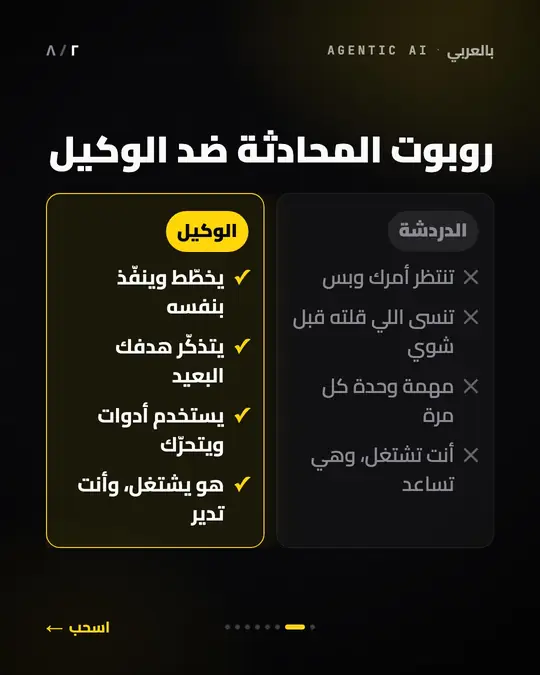
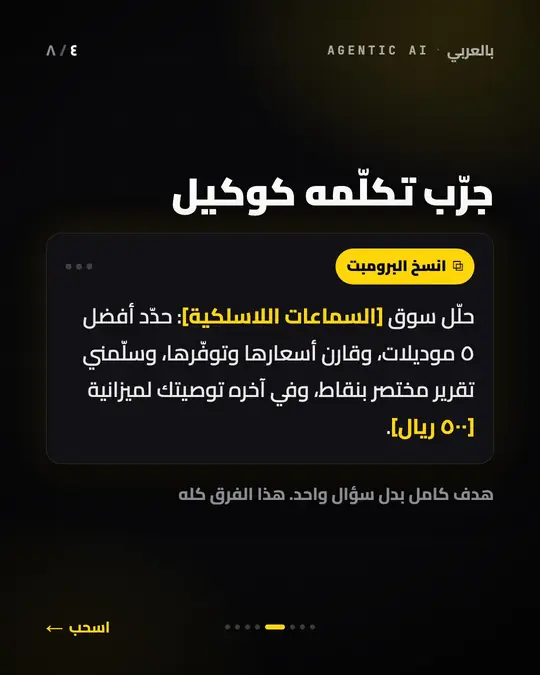
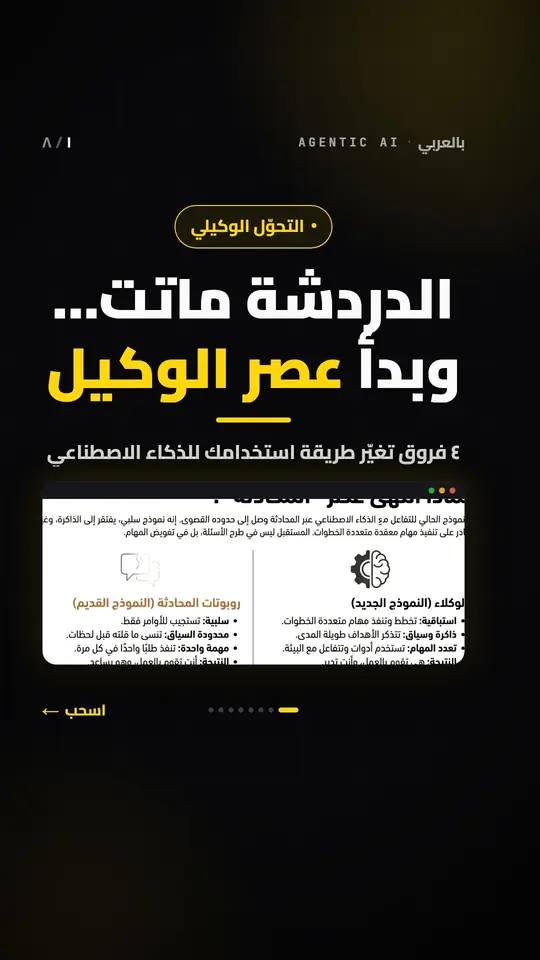
«الدردشة ماتت… وبدأ عصر الوكيل»، من الدرس 1.1: الشرائح 1 و2 و4 من 8.
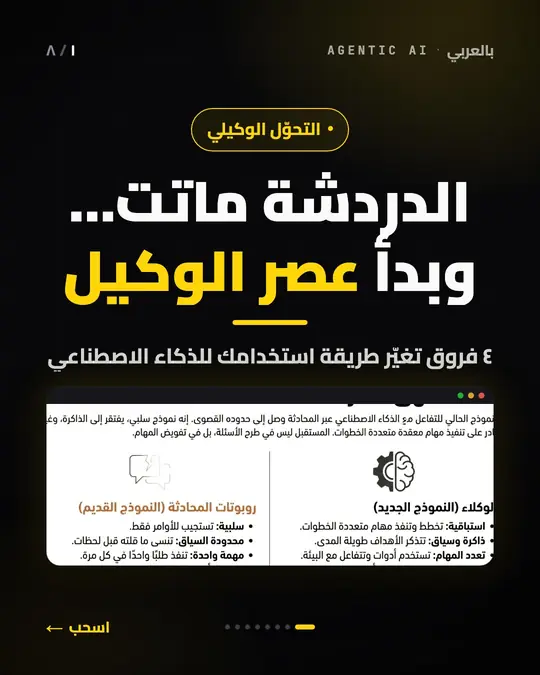
  1. شريحة الغلاف: «الدردشة ماتت… وبدأ عصر الوكيل»، فوق لقطة من الدرس 1.1 تقارن روبوت المحادثة بالوكيل.
    1 · الغلاف
  2. الشريحة الثانية: روبوت المحادثة ضد الوكيل، أربعة فروق جنباً إلى جنب.
    2 · المقارنة
  3. الشريحة الرابعة: «جرّب تكلّمه كوكيل»، وبرومبت جاهز للنسخ.
    4 · برومبت تجرّبه

أغلفة أخرى، وبمقاس تيك توك
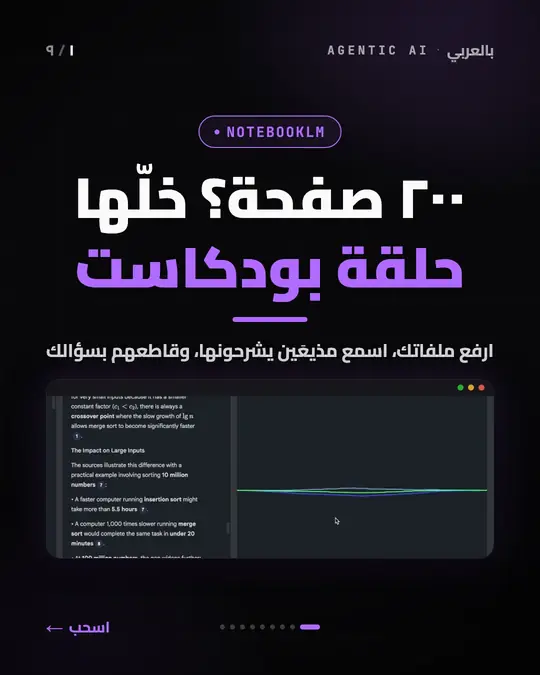
  • شريحة غلاف: «٢٠٠ صفحة؟ خلّها حلقة بودكاست»، مع لقطة من درس NotebookLM.
    NotebookLM · إنستجرام وفيسبوك
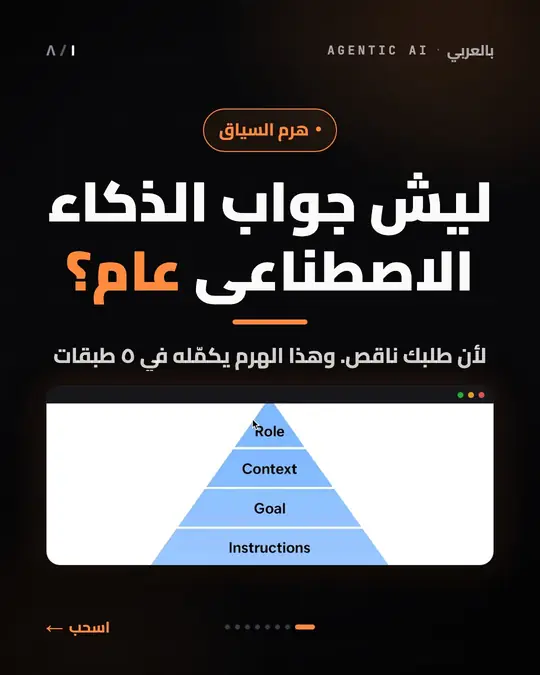
  • شريحة غلاف: «ليش جواب الذكاء الاصطناعي عام؟»، من درس هرم السياق.
    هرم السياق · إنستجرام وفيسبوك
  • غلاف «الدردشة ماتت… وبدأ عصر الوكيل» نفسه بمقاس تيك توك الطولي.
    الغلاف نفسه · تيك توك
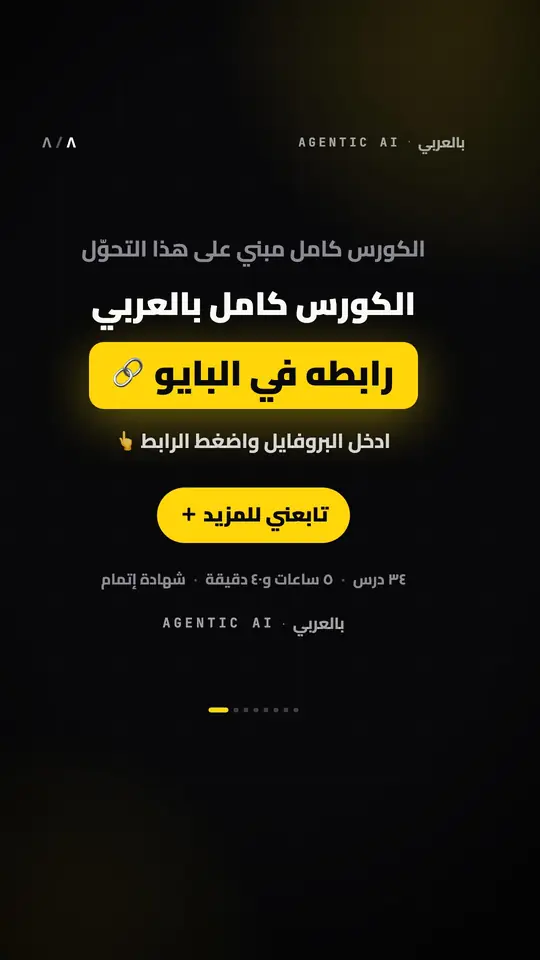
  • شريحة الختام في تيك توك: «الكورس كامل بالعربي» و«رابطه في البايو» وزر المتابعة.
    ختام تيك توك: الرابط في البايو

وعلى تيك توك، إلى أن يوافق تيك توك على التطبيق، يُنشر المنشور بخصوصية «أنا فقط» ثم يُجعل عامّاً باليد، كما في «ما الذي لا نَعِد به» أدناه. والحساب حساب مؤسس المنتج، والدورة دورته.

وما الذي في لوحة التحكم

حملات الكلمات المفتاحية

لكل حملة كلماتها، ورسالتها الخاصة، وردّها العام. حملة مربوطة بمنشور بعينه تسبق الحملة العامة على الكلمة نفسها، فلا تتنازع اثنتان على تعليق واحد.

ردود الذكاء الاصطناعي

الرسائل الواردة يجيب عنها نموذج ذكاء اصطناعي بتعليماتك أنت وبقاعدة معلومات تكتبها عن نشاطك، قارئاً آخر ثماني رسائل من المحادثة حتى يفهم السياق. ويستطيع أن يردّ بأزرار سريعة أو ببطاقات متتابعة.

صندوق وارد موحّد
محادثات إنستجرام وفيسبوك في مكان واحد. تقرأ، وتردّ بنفسك، وتوقف الردّ الآلي في محادثة واحدة دون أن تُعطّله في غيرها.
جدولة المنشورات والريلز
صور ومقاطع فيديو وكاروسيل، إلى إنستجرام وفيسبوك وتيك توك من إدخال واحد. والفيديو يُنشر على إنستجرام ريلز ويظهر في الصفحة الرئيسية أيضاً، لا في تبويب الريلز وحده.
منشورات الكاروسيل
من صورتين إلى عشر على إنستجرام وفيسبوك، وحتى 35 على تيك توك، من محرّر واحد، ولتيك توك مجموعة طولية 9:16 خاصة به إن شئت. تضع الصور بنفسك، أو يكتبها الاستوديو من دروسك.
النشر على تيك توك
عبر واجهة النشر الرسمية من تيك توك (Content Posting API): فيديو وكاروسيل صور، ومعهما ما يشترطه تيك توك على كل منشور: من يراه، وكيف يتفاعل الناس معه، والإفصاح عن المحتوى التجاري، وموافقتك الصريحة. والنشر العلني التلقائي ينتظر موافقة تيك توك على التطبيق، كما في الأسفل.
استوديو الكاروسيل
مكتبة دروسك، ومسودّاتٌ يكتبها الذكاء الاصطناعي وتعدّلها أنت، وأسبوعٌ مخطَّط بضغطة واحدة — كما في الأعلى.
مطابقة عربية حقيقية
الهمزات والتاء المربوطة والألف المقصورة والتشكيل والتطويل — كلها تُوحَّد قبل المقارنة، كما في الفقرة أعلاه.
أرقام تستطيع تصديرها
عدد التعليقات والرسائل والنسب، بالساعة وباليوم وبالحملة، وتصدير التفاعلات إلى ملف CSV تفتحه في أي برنامج جداول.
سجلّ النشاط
كل تعليق أجابت عنه حملة، وهل خرجت رسالته أم فشلت ولماذا. تبحث فيه، وتصفّيه بالحالة والمنصّة والحملة.
أكثر من حساب، ولفريقك دخوله
تتنقّل بين حساباتك من دخول واحد، ولكلٍّ منها حملاته وصندوقه وإعداداته. ولكل شخص في فريقك دخوله ودوره: مالك أو مشغّل أو مشاهد.
حالة الربط
تعرض اللوحة إن كان ربط كل حساب ما زال صالحاً، وتعيد فحصه متى طلبت، ويُفحَص ربط تيك توك تلقائياً كل يوم.

وثلاثة أرقام ثابتة في البرنامج نفسه:

180
رسالة تلقائية في الساعة لكل حساب، تحت سقف ميتا نفسها (نحو 200).
24
ساعة بين رسالتين تلقائيتين للشخص نفسه.
8
رسائل من المحادثة يقرأها الذكاء الاصطناعي قبل أن يردّ.

المنصّات، وما تحتاجه

ما يعمل على كل منصّة، وما يلزمك قبل أن نبدأ:

  • إنستجرام

    ما تحتاجه

    حساب احترافي (أعمال أو صانع محتوى) مرتبط بصفحة فيسبوك، وصلاحية إدارية عليهما. الحساب الشخصي لا تسمح ميتا بأتمتته.

    ما يعمل عليها

    من التعليق إلى الرسالة الخاصة، وردود الذكاء الاصطناعي على الرسائل، وجدولة الصور والريلز والكاروسيل.

  • فيسبوك

    ما تحتاجه

    صفحة فيسبوك تديرها — وهي نفسها المرتبطة بحساب إنستجرام.

    ما يعمل عليها

    تعليقات الصفحة ومحادثات ماسنجر، وجدولة المنشورات والفيديو والكاروسيل.

  • تيك توك

    ما تحتاجه

    حساب تيك توك تدخل إليه من صفحة تيك توك نفسها. لا نطلب كلمة مرورك أبداً.

    ما يعمل عليها

    النشر وحده: فيديو وكاروسيل صور. وإلى أن يوافق تيك توك على التطبيق، يُنشر المنشور «أنا فقط» على حساب خاص، أو يصل إلى مسودّاتك. لا تعليقات ولا رسائل على تيك توك.

  • يوتيوب

    ما تحتاجه

    قناة على يوتيوب تربطها بتسجيل الدخول بجوجل من صفحة جوجل نفسها. لا نطلب كلمة مرورك أبداً.

    ما يعمل عليها

    الرفع وحده: تصل الريلز إلى قناتك بوصفها Shorts. وإلى أن تراجع جوجل التطبيق تُرفع خاصّة. لا يُقرأ شيء من مشاهديك. تستخدم خدمات واجهة برمجة يوتيوب — راجع سياسة الخصوصية.

  • استوديو الكاروسيل

    ما تحتاجه

    جهاز كمبيوتر عليه «العامل» — جهاز ماك اليوم — ومجلد فيه فيديوهات دروسك.

    ما يعمل عليه

    يكتب الكاروسيل من دروسك ويرسمه بمقاسَي 4:5 و9:16. وحين يكون الجهاز مغلقاً، تنتظر مهامّه دورها.

الأمان والخصوصية

  • واجهات رسمية فقط

    إنستجرام وفيسبوك عبر واجهة ميتا الرسمية (Graph API)، وتيك توك عبر واجهتيه الرسميتين للدخول والنشر. لا كلمات مرور، ولا متصفّح يتظاهر بأنه أنت.

  • رموز الوصول مشفّرة

    الرموز التي تُصدرها ميتا وتيك توك تُشفَّر قبل أن تُخزَّن (AES-256-GCM)، وتستطيع سحبها من إعدادات حسابك نفسه في أي وقت.

  • فيديوهاتك تبقى على جهازك

    ما يغادر جهازك: معاينةٌ صغيرة للذكاء الاصطناعي، وصورٌ مصغّرة للّحظات التي اختارها، والشرائح النهائية التي تُنشر. والعامل يتّصل بالخارج ولا يستقبل شيئاً.

  • الفصل والحذف بيدك

    تفصل أي حساب متى شئت دون ذكر سبب. وكيف تُحذف البيانات، ومنها بيانات تيك توك، في صفحة حذف البيانات، وما يُحفَظ ومدّته في سياسة الخصوصية.

ما الذي تدفع مقابله

مفتوح المصدرMIT

البرنامج نفسه مفتوح المصدر برخصة MIT، ويمكنك تنزيله وتشغيله على خادمك مجاناً من المستودع العلني.

ما يُباع هنا ليس الكود

  • ربط الحساب بواجهة ميتا
  • الإعداد
  • المتابعة
  • وجود مَن يُصلح العطل حين يقع
  • البداية
  • النمو
  • الوكالات

ثلاث باقات، والفرق بينها عدد الحسابات وعدد الأشخاص ومقدار العمل الذي نقوم به معك — لا الميزات: في كل باقة كل ما في المنتج.

قارن الباقات

وما الذي لا نَعِد به

لا دقيقة محدَّدة للنشر
المنشور المجدول يدخل طابوراً يُفرَّغ على فترات، لا على الدقيقة. إن كان توقيت النشر بالدقيقة يهمّك، فهذا ليس ما يفعله البرنامج اليوم.
على تيك توك، لا نشر علني تلقائي حتى الآن
تيك توك يراجع التطبيق قبل أن يسمح له بالنشر للعموم. وإلى أن يوافق على هذا التطبيق، إمّا أن يُنشر منشور تيك توك بخصوصية «أنا فقط»، ولا يقبلها تيك توك إلا على حساب خاص، وإمّا أن يصل إلى مسودّاتك لتنشره بنفسك من تطبيق تيك توك. ومتى تأتي الموافقة فذلك قرار تيك توك، لا قرارنا. أمّا حلقة التعليق والرسالة الخاصة فتعمل على إنستجرام وفيسبوك وحدهما.
لا ضمان لوقت التشغيل ولا للتسليم
ميتا قد تُبطئ الإرسال أو ترفضه في أي لحظة، ولا شيء في البرنامج يستطيع أن يَعِد بغير ذلك. ما نَعِد به أن الحدث يُسجَّل قبل الردّ على ميتا، وأن ما فشل يُعاد عدداً محدوداً من المحاولات ثم يتوقف ويبقى مكتوباً لمراجعته.
ما يُحفَظ ومدّته مكتوبان في سياسة الخصوصية
نص الرسائل الخاصة يُحفَظ ليظهر في صندوق الوارد، وهذا ظاهر لك في المنتج نفسه. أما بقية ما يُحفَظ، ومدّة بقائه، وكيف يُحذف، فمكتوب في سياسة الخصوصية وفي صفحة حذف البيانات، وهما المرجع. هذه الصفحة لا تختصرهما عمداً: الاختصار نسخة ثانية يجب إبقاؤها صحيحة.

أسئلة تتكرّر

أيّ الحسابات أستطيع ربطها؟

على إنستجرام: حساب احترافي (أعمال أو صانع محتوى) مرتبط بصفحة فيسبوك، مع صلاحية إدارية عليهما. وعلى فيسبوك: الصفحة نفسها. وعلى تيك توك: حسابك، بالدخول من صفحة تيك توك. أمّا الحساب الشخصي على إنستجرام فلا تسمح ميتا بأتمتته، وهذا شرطها لا شرطنا.

هل هو رسمي؟ وهل حسابي في أمان؟

يعمل عبر الواجهات الرسمية وحدها: واجهة ميتا (Graph API)، وواجهتَي تيك توك للدخول والنشر. لا نطلب كلمة مرورك، ورموز الوصول تُشفَّر قبل أن تُخزَّن.

ويبقى الإرسال تحت سقف ميتا: 180 رسالة آلية في الساعة لكل حساب، مقابل نحو 200 عندها، ورسالة آلية واحدة للشخص نفسه كل 24 ساعة. ولا أحد يستطيع أن يَعِد بأن منصّةً لن تقيّد حساباً أبداً؛ البقاء داخل حدودها هو ما في يد البرنامج.

ما الذي يعمل على تيك توك قبل أن يوافق على التطبيق؟

النشر وحده: فيديو وكاروسيل صور، مع الإعدادات التي يشترطها تيك توك على كل منشور. وإلى أن يوافق، إمّا أن يُنشر المنشور بخصوصية «أنا فقط» — ولا يقبلها تيك توك إلا والحساب خاص — وإمّا أن يصل إلى مسودّاتك لتنشره من تطبيق تيك توك. ولا يقبل تيك توك أكثر من خمس مسودّات معلّقة في 24 ساعة؛ ما يزيد عليها ينتظر، ويخرج في دورة لاحقة بعد أن تنشر إحداها. ولا أتمتة للتعليقات ولا للرسائل على تيك توك.

هل يفهم اللهجات؟

المطابقة تقارن الكتابة لا المعنى: توحّد الهمزات والتاء المربوطة والألف المقصورة، وتحذف التشكيل والتطويل، لكنها لا تعرف أن «بكم» و«كم السعر» سؤال واحد. لذلك تأخذ الحملة أكثر من كلمة، فتكتب فيها الصيغ التي يكتبها جمهورك.

أمّا ردود الذكاء الاصطناعي فيكتبها نموذج لغوي عام يقرأ الرسالة كما كُتبت، بلهجتها، ويردّ بالأسلوب الذي تحدّده في تعليماتك — بلهجتك إن شئت.

ما «العامل»؟

برنامج صغير يعمل على جهازك — جهاز ماك اليوم — بجوار فيديوهات دروسك. يجد الدروس، ويفهرسها بالذكاء الاصطناعي، ويلتقط الإطارات، ويرسم الشرائح؛ والتطبيق يكتب الكلمات. وهو يتّصل بالتطبيق ولا يستقبل اتصالاً، فلا شيء على جهازك مكشوف. وحين يكون الجهاز مغلقاً، تنتظر مهامّ الاستوديو إلى أن يعود.

هل تُرفع فيديوهاتي؟

لا، فيديوهاتك الكاملة تبقى على جهازك. ليفهم الدرس، يرسل العامل إلى الذكاء الاصطناعي معاينةً صغيرة منخفضة الدقة، واللقطات التي على الشرائح تُؤخذ من ملفك الأصلي على جهازك. وما يُرفع فعلاً: صورٌ مصغّرة للّحظات المختارة لتراها في اللوحة، والشرائح النهائية لأنها ما يُنشر.

هل أستطيع الإلغاء؟

نعم. تفصل أي حساب في أي وقت دون ذكر سبب، ولا يُنشر منه ولا يُرسَل بعدها شيء جديد. ولا اشتراك تلغيه من صفحة دفع: الفوترة تجري بيننا مباشرة، وشروطها — ومنها مدة الإشعار — نتّفق عليها قبل أن تبدأ.

هل أستطيع الاشتراك بنفسي الآن؟

ليس بعد. ميتا تمنح الأذونات التي يحتاجها البرنامج حساباً حساباً، فيُربط كل حساب يدوياً ومعك. اكتب لنا على elamirmansour@outlook.com، ونخبرك بما يلزم وبالمدة المتوقعة قبل أي التزام.

هل يخطئ الذكاء الاصطناعي؟

قد يخطئ. الردود يكتبها نموذج لغوي (Gemini من جوجل) بتعليماتك وبقاعدة المعلومات التي تكتبها. لذلك تستطيع إيقاف الردّ الآلي في أي محادثة والردّ بنفسك من صندوق الوارد، وأول ردّ آليّ في المحادثة يُخبر الشخص أنه يتحدّث إلى خدمة آلية. وما يُرسَل إلى جوجل لكتابة الردّ مكتوب في سياسة الخصوصية.

كم يكلّف؟

الباقات الثلاث، وما يتغيّر بينها فعلاً، في صفحة الأسعار. في كل باقة كل ميزات المنتج؛ والفرق عدد الحسابات وعدد الأشخاص ومقدار العمل الذي نقوم به معك.

ابدأ من تعليق واحد

الباقات الثلاث وما يتغيّر بينها فعلاً على صفحة الأسعار. ولمن حسابه مربوط بالفعل، لوحة التحكم من هنا.

أو شغّله بنفسك: الكود كلّه مفتوح برخصة MIT على GitHub.


Instagram, Facebook, TikTok · Arabic-first

A comment becomes a conversation

A keyword in a comment sends the private message, posts the public reply, and likes the comment. AI answers whatever they say next. And Carousel Studio turns your video lessons into posts for Instagram, Facebook and TikTok.

Get in touch

Tell us what you want automated, and we reply with a price and the expected time to get connected, before you commit to anything.

Who it is for

Anyone who sells from their own account, to an audience that writes in Arabic:

  • Creators

    Your comments fill up with the same question. One keyword on a campaign answers it privately, in your own words, while you film the next video.

  • Course sellers

    Your lessons become carousels that point back to the course, and a word in the comments sends its link privately — which is what the posts further down this page do.

  • Shops and small businesses

    “How much?”, “Do you deliver?” and “Where are you?” arrive as comments, and the answer goes to their messages, in the Arabic your customers actually write.

What happens when someone comments

Three steps on Instagram and Facebook, and the first is the only one the customer does. The rest runs on its own:

  1. The match

    You set the keywords on the campaign — several if you want — and choose whether it fires on one specific post or on anything the account publishes. A campaign tied to one post beats a general one on the same keyword, so two campaigns never fight over a comment.

    Campaign keywords price how much السعر

  2. The private message

    The text you wrote on the campaign reaches them privately — not in the comments, where everyone reads it and nobody replies. If they answer, AI takes the rest of the conversation using your own instructions and your own knowledge base, and the first automated reply in a conversation is headed by the automated-service disclosure Meta requires.

    The line the software adds 🤖 رد آلي من المساعد الذكي

  3. The public trace

    A public reply under the comment telling them to check their messages, and a like on the comment. The public reply is optional and you write it on the campaign; the like is always attempted.

    If Meta refuses the public reply — a missing permission, or a comment that was deleted — the private message still goes out, and the reason it failed is recorded on the interaction.

Arabic here is not a translation

People do not write the same word the same way twice. These are four different spellings of one word, and all four match the keyword هدية (hadiyya, a gift):

  • هديه
  • هديـــة
  • هديّة
  • الهدية

all normalise to

هدية

Hamza forms collapse to a bare alef, teh marbuta to heh, alef maksura to yeh, and diacritics and tatweel are stripped, before anything is compared. Short keywords carry a known danger — تم sits inside اهتمام and تمام — so every campaign picks its own matching mode: anywhere in the text, or whole word only.

The dashboard itself is right-to-left by default rather than an English layout with Arabic poured into it. Digits stay Latin on purpose, because they are compared and copied against Meta's own dashboards.

Your brand, your voice
Your colours, fonts and sign-off on every slide, and a voice guide the AI writes to — in your own voice and your own dialect.
Your own calls to action
The last slide, the caption line and the private message all use the words you set in Settings: one line for Instagram, one for TikTok.
A keyword for every post
Every carousel comes with its own keyword and the private message it sends, so the post feeds the loop above. If a campaign of yours already answers that word, it is reused instead of duplicated.
Plan my week
One button proposes the week's posts from your lessons, spread across your free posting slots. Keep the ones you like, and write them all with one click.

How the Studio works

Three steps. The first and the last are yours; the one in between is the AI's:

  1. Pick a lesson

    From your lesson library: one lesson or up to three, or an idea you write yourself. Leave the keyword empty and the Studio suggests one.

    Start From a lesson From an idea

  2. The AI writes the slides

    From what the lesson actually teaches: every slide between the cover and the ask rests on the lesson's notes or its moments, and a slide with no source is rewritten or dropped. The screenshots are real frames from the lesson's own video, not generated images.

    The rule it writes by: no feature, number or result the lesson does not state.

  3. Review and schedule

    Edit any slide in a phone-sized preview, then pick one of your slots: the carousel goes out on Instagram and Facebook, and its keyword campaign is set up with it.

    TikTok gets its own 9:16 version, scheduled with it, or held in a queue you send yourself until TikTok approves the app.

The worker is a small helper on your computer that does the heavy work, right next to your videos.

Your full videos never upload anywhere; only small previews go to the AI. And it only ever calls out, so nothing on your computer is exposed.

Made with AutoReply Pro

Every carousel here is real: made from the course's own lessons, with frames taken from its videos, and drawn by the same slide templates Carousel Studio renders with. This app publishes them to Instagram and Facebook on a twice-daily schedule, and posted their 9:16 versions to TikTok too.

14
carousels from the course's lessons
3
platforms: Instagram, Facebook and TikTok
2
sizes of each: 4:5 and 9:16

One carousel, slide by slide

“Chat is dead, the age of the agent has begun”, from lesson 1.1: slides 1, 2 and 4 of 8, in Arabic as published.

  1. Cover slide, in Arabic: “Chat is dead… and the age of the agent has begun”, over a frame from lesson 1.1 comparing chatbots with agents.
    1 · Cover
  2. Slide 2, in Arabic: chatbot versus agent, four differences side by side.
    2 · The comparison
  3. Slide 4, in Arabic: “Talk to it like an agent”, with a prompt ready to copy.
    4 · A prompt to try

More covers, and the TikTok size

  • Cover slide, in Arabic: “200 pages? Make it a podcast episode”, with a screenshot from the NotebookLM lesson.
    NotebookLM · Instagram and Facebook
  • Cover slide, in Arabic: “Why is the AI's answer so generic?”, from the lesson on the context pyramid.
    The context pyramid · Instagram and Facebook
  • The same “Chat is dead” cover at TikTok's 9:16 size.
    The same cover · TikTok
  • The last TikTok slide, in Arabic: “The full course in Arabic”, “Link in bio”, and a follow button.
    TikTok's own ending: link in bio

On TikTok, until TikTok approves the app, a post goes up as “Only me” and is made public by hand, as “What this does not promise” explains below. The account is the founder's, and so is the course.

And what is in the dashboard

Keyword campaigns

Each campaign has its own keywords, its own private message and its own public reply. A campaign tied to one post beats a general one on the same keyword, so two campaigns never fight over a comment.

AI replies to messages

Incoming messages are answered by an AI model using your own instructions and a knowledge base you write about your business, reading the last eight messages of the thread for context. It can reply with quick-reply buttons or a card carousel.

One shared inbox
Instagram and Facebook conversations in one place. Read them, reply yourself, and pause the bot on a single conversation without turning it off anywhere else.
Scheduled posts and reels
Images, video and carousels, to Instagram, Facebook and TikTok from one entry. Video publishes to Instagram as a reel and appears in the main feed too, not only in the Reels tab.
Carousel posts
Two to ten images on Instagram and Facebook, up to 35 on TikTok, from one composer — and TikTok can take its own 9:16 set. Add the images yourself, or let the Studio write them from your lessons.
TikTok publishing
Through TikTok's official Content Posting API: video and photo carousels, with the controls TikTok requires on every post — who can see it, how people can interact with it, disclosure of branded content, and your explicit consent. Public auto-posting waits on TikTok's approval of the app; more on that below.
Carousel Studio
Your lesson library, drafts the AI writes and you edit, and a week planned in one click — as above.
Arabic matching that works
Hamza forms, teh marbuta, alef maksura, diacritics and tatweel are all normalised before matching, as above.
Numbers you can export
Comments, messages and conversion, by hour, by day and by campaign — and an interaction export as CSV that opens in any spreadsheet.
Activity log
Every comment a campaign answered, and whether its message went out or failed, and why. Search it, and filter it by status, platform and campaign.
Several accounts, and logins for your team
Switch between your accounts from one sign-in, each with its own campaigns, inbox and settings. Everyone on your team gets their own login and a role: owner, operator or viewer.
Connection health
The dashboard shows whether each account's connection is still valid and re-checks it when you ask, and the TikTok connection is checked automatically every day.

And three numbers fixed in the software itself:

180
automated messages an hour per account, held under Meta's own ceiling of about 200.
24
hours between two automated messages to the same person.
8
messages of the thread the AI reads before it answers.

Platforms, and what you need

What works on each platform, and what you need before we start:

  • Instagram

    What you need

    A professional account (Business or Creator) linked to a Facebook Page, with admin access to both. Meta does not allow automation on a personal account.

    What works there

    Comment-to-message campaigns, AI replies to messages, and scheduled images, reels and carousels.

  • Facebook

    What you need

    A Facebook Page you manage — the one your Instagram account is linked to.

    What works there

    Page comments and Messenger conversations, and scheduled posts, video and carousels.

  • TikTok

    What you need

    A TikTok account you sign in to on TikTok's own page. We never ask for your password.

    What works there

    Publishing only: video and photo carousels. Until TikTok approves the app, a post goes up as “Only me” on a private account, or lands in your drafts. No comments or messages on TikTok.

  • YouTube

    What you need

    A YouTube channel, connected by signing in with Google on Google's own page. We never ask for your password.

    What works there

    Uploading only: your reels go to your channel as Shorts. Until Google audits the app, they upload as private. Nothing is read from your viewers. Uses YouTube API Services — see the privacy policy.

  • Carousel Studio

    What you need

    A computer running the worker — a Mac, today — and a folder with your lesson videos.

    What it does

    Writes carousels from your lessons and draws them at 4:5 and 9:16. While the computer is off, its jobs simply wait.

Security and privacy

  • Official APIs only

    Instagram and Facebook through Meta's official Graph API; TikTok through its official Login Kit and Content Posting API. No passwords, and no browser pretending to be you.

  • Tokens are encrypted

    The access tokens Meta and TikTok issue are encrypted before they are stored (AES-256-GCM), and you can revoke them from your own account settings at any time.

  • Your videos stay on your computer

    What leaves it: a small preview for the AI, small thumbnails of the moments it picked, and the finished slides that get published. And the worker only ever calls out; nothing connects in.

  • Disconnecting and deleting are yours

    Disconnect any account whenever you like, without giving a reason. How data is deleted, TikTok's included, is on the data deletion page; what is kept, and for how long, is in the privacy policy.

What you are paying for

Open sourceMIT

The software itself is open source under the MIT licence, and you can download it and run it on your own server for free from the public repository.

What is sold here is not the code

  • Connecting the account to Meta
  • The setup
  • The follow-up
  • Having someone who fixes it when it breaks
  • Starter
  • Growth
  • Agency

Three plans, and what differs between them is the number of accounts, the number of people, and how much of the work we do with you — never the features: every plan has all of them.

Compare the plans

What this does not promise

No exact publishing minute
A scheduled post joins a queue that is drained on an interval, not on the minute. If minute-level timing matters to you, this is not what the software does today.
No public auto-posting to TikTok, yet
TikTok reviews an app before it lets it post publicly. Until it approves this one, a TikTok post either goes up as “Only me”, which TikTok accepts only on a private account, or lands in your TikTok drafts for you to post from the app. When that approval comes is TikTok's decision, not ours. The comment-to-message loop itself runs on Instagram and Facebook only.
No uptime or delivery guarantee
Meta can throttle or refuse a send at any moment, and nothing in the software can promise otherwise. What it does promise is that the event is written down before Meta is acknowledged, and that a failure is retried a limited number of times before it stops and is left on record to be looked at.
What is kept, and for how long, is in the privacy policy
Direct-message text is stored so it can appear in your inbox, which you can see in the product itself. What else is kept, how long it stays and how to have it deleted is in the privacy policy and on the data deletion page, which are the authoritative statement. This page deliberately does not summarise them: a summary is a second version to keep true.

Questions people ask

Which accounts can I connect?

On Instagram, a professional account (Business or Creator) linked to a Facebook Page, with admin access to both. On Facebook, that Page. On TikTok, your account, by signing in on TikTok's own page. A personal Instagram account cannot be automated: that is Meta's rule, not ours.

Is it official? Is my account safe?

It uses the official APIs and nothing else: Meta's Graph API, and TikTok's Login Kit and Content Posting API. We never ask for your password, and access tokens are encrypted before they are stored.

Sending stays under Meta's ceiling: at most 180 automated messages an hour per account, against Meta's roughly 200, and one automated message per person every 24 hours. Nobody can promise that a platform will never restrict an account; staying inside its limits is the part this software controls.

What works on TikTok before it approves the app?

Publishing, and only publishing: videos and photo carousels, with the settings TikTok requires on every post. Until TikTok approves the app, a post either goes up as “Only me” — which TikTok accepts only while the account is private — or lands in your drafts for you to post from the TikTok app. TikTok also allows at most five drafts waiting in any 24 hours; past that, a post waits and goes out on a later round, once you have posted one. There are no comment or message automations on TikTok.

Does it understand Arabic dialects?

Matching compares spelling, not meaning. It evens out hamza, teh marbuta and alef maksura, and strips diacritics and tatweel, but it does not know that بكم and كم السعر ask the same thing. So a campaign takes several keywords, and you list the ways your audience writes.

The AI replies come from a general-purpose language model that reads the message as written, dialect and all, and answers the way your instructions say — in your own dialect, if you want.

What is the worker?

A small program that runs on your computer — a Mac, today — next to your lesson videos. It finds the lessons, indexes them with the AI, takes the screenshots and draws the slides; the app writes the words. It only ever calls out to the app, so nothing on your computer is exposed, and while the computer is off the Studio's jobs simply wait for it.

Are my videos uploaded?

No. Your full videos stay on your computer. To understand a lesson, the worker sends the AI a small, low-resolution preview of it, and the screenshots on the slides are taken from your original file, on your own machine. What is uploaded: small thumbnails of the chosen moments, so you can see them in the dashboard, and the finished slides, because they are what gets published.

Can I cancel?

Yes. You can disconnect any account at any time without giving a reason, and nothing new is posted or sent from it after that. There is no checkout subscription to cancel: billing is arranged with you directly, and its terms, notice included, are agreed before you start.

Can I sign up on my own?

Not yet. Meta grants the permissions this needs account by account, so every account is connected by hand, with you. Write to elamirmansour@outlook.com and we tell you what it would take, and how long, before you commit to anything.

Can the AI get an answer wrong?

It can. Replies are written by a language model — Google's Gemini — from your instructions and the knowledge base you write, and a model can be wrong. So you can pause the bot on any conversation and answer yourself from the inbox, and the first automated reply tells the person they are talking to an automated service. What is sent to Google to write a reply is in the privacy policy.

How much does it cost?

The three plans, and what actually changes between them, are on the pricing page. Every plan has every feature; they differ in the number of accounts, the number of people, and how much of the work we do with you.

Start with one comment

The three plans, and what actually changes between them, are on the pricing page. If your account is already connected, the dashboard is here.

Or run it yourself: all of it is MIT-licensed on GitHub.